DVD
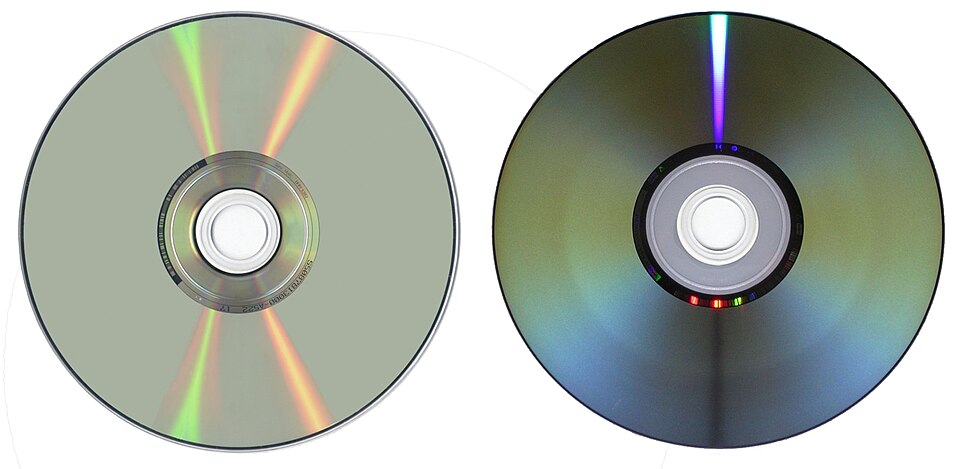

A DVD (which means Digital Versatile Disc or a Digital Video Disc) is an optical disc capable of storing up to 4.7 GB of data, more than six times what a CD can hold. DVDs are often used to store movies at better quality than a VHS video tape and a Video CD. DVDs can also have interactive menus and bonus features such as alternative or deleted scenes and commentaries. Like CDs, DVDs are read with a laser.
The DVD can have one or two sides, and one or two layers of data per side; the number of sides and layers determines how much it can hold. A 12 cm diameter disc may have one of the following storage capacities:
- DVD-5: single sided, single layer, 4.7 gigabytes (GB), or 4.38 gibibytes (GiB)
- DVD-9: single sided, double layer, 8.5 GB (7.92 GiB)
- DVD-10: double sided, single layer on both sides, 9.4 GB (8.75 GiB)
- DVD-14: double sided, double layer on one side, single layer on other, 13.3 GB (12.3 GiB)
- DVD-18: double sided, double layer on both sides, 17.1 GB (15.9 GiB)
There are also 8 cm DVDs with a storage capacity of 1.5 GB.
The capacity of a DVD-ROM can be determined by noting the number of data sides, and looking at the data side(s) of the disc. Double-layered sides are usually gold-colored, while single-layered sides are usually silver-colored, like a CD. One additional way to tell if a DVD contains one or two layers is to look at the center ring on the underside of the disc. If there are two barcodes, it is a dual layer disc. If there is one barcode, there is only one layer.
Etymology
The Oxford English Dictionary comments that, “In 1995, rival manufacturers of the product initially named digital video disc agreed that, in order to emphasize the flexibility of the format for multimedia applications, the preferred abbreviation DVD would be understood to denote digital versatile disc.” The OED also states that in 1995, “The companies said the official name of the format will simply be DVD. Toshiba had been using the name ‘digital video disc’, but that was switched to ‘digital versatile disc’ after computer companies complained that it left out their applications.”
“Digital versatile disc” is the explanation provided in a DVD Forum Primer from 2000 and in the DVD Forum’s mission statement, which the purpose is to promote broad acceptance of DVD products on technology, across entertainment, and other industries.
Because DVDs became highly popular for the distribution of movies in the 2000s, the term DVD became popularly used in English as a noun to describe specifically a full-length movie released on the format; for example the sentence to “watch a DVD” describes watching a movie on DVD.
DVD data storing
Both CD and DVD discs have equal sizes (diameter, thickness etc.). However, the amount of information they can store is different. These discs are made of the same materials and have the same methods of production.
CDs and DVDs use the same way of keeping information. Both CDs and DVDs have pits and bumps on the data track (the data track represents a path which has certain information). The information is read by a laser.
A DVD disk has several layers, which are made of plastic. All layers have a thickness of 1.2 millimeters. An injection used on a polycarbonate plastic leads to the creation of microscopic bumps. Today’s production uses this type of plastic to create different things because it can resist very high and low temperatures.
When layers are made, the bumps appear. Many bumps form one continuous spiral that can include information. After that a spray of a special reflective layer covers the bumps.
Aluminum is applied behind inner layers and semi-reflective gold covers the outer layers. This helps the laser to concentrate through the outer layers onto the inner ones. Then, after applying a protective liquid (lacquer) and pressing the layers, they are treated with infrared light.
Tracks on a DVD
Every track on a DVD disk circles from its center to the edge. The distance between the tracks on a DVD disk is 740 nanometers. Only a very precise mechanism can read the bumps on the disk, because they are very small (320×400×120 nanometers). The aluminum side of the disk has pits, but the side which is read by the laser has bumps. Because the size of the bumps are very small, a DVD track is very long. A data track of a DVD layer is about 7.5 miles long. This is the length of an ordinary DVD disk. The track of a disc with two sides would be about 30 miles long.
Written for younger readers
DVD, in simpler words
This version comes from Wikijunior, a set of books written for children aged 8 to 11. It is shorter and uses plainer language than the article above.
From Wikijunior: How Things Work
DVD stands for “Digital Versatile Disc”. A DVD is used to hold information that can be read by a computer using a laser. DVDs are used mainly for movies, television programs and computer programs like games. DVDs are the same shape and size as compact discs but they store much more information in a different way.
The DVD was invented by a group of companies including most of the world’s largest makers of home video equipment including Toshiba, Philips, Sony and Matsushita Electric.
A DVD player is powered by electricity. DVD players can either be powered by electricity or batteries.
DVDs are of the same shape and thickness as CDs, and they are made using some of the same materials and manufacturing methods. Like a CD, the data on a DVD is held in the form of small pits and bumps on the disc. A DVD is made up of several layers of plastic that is 1.2 millimetres (0.047 in) thick. Each layer is made by injection moulding plastic. This forms a disc that has tiny bumps (often called pits) arranged as a single very long spiral track of data. These bumps are where all the data is stored. The bumps and pits on a DVD are coded information.
Each writeable layer of a DVD has a spiral track of data. On single-layer DVDs, the track always circles from the inside of the disc to the outside. That the spiral track starts at the center means that a single-layer DVD can be smaller than 12 centimetres (4.7 in) if desired.
DVDs are read by a laser. The laser senses the pits and bumps and tells the DVD player what to play. The DVD player or computer often knows when the DVD is in or not. If the DVD is very scratched or is breaking or broken, it cannot be read by the laser.
The DVD is not dangerous by itself unless it is broken. Then the pieces are very sharp and could cut your fingers - or your feet if you step on them. The laser in the DVD player can also hurt your eyes.
It stores digital information that can be used by a DVD player or computer.
The first DVDs had a single layer and could store around 4.5 Gigabytes of data. Later on scientists found a way to make more layers so it could store even more data. These multi-layered DVDs are called dual layer DVDs which can store around 8.5 Gigabytes of data. Nowadays there are two more types of DVDs which are called Blu-ray and HD-DVD that can store even more. The single layer Blu-ray disc can store 25 Gigabytes of data while the dual layer Blu-ray disc’s can store 50 Gigabytes of data. The HD-DVDs can store around 15 Gigabytes of data per layer. The HD-DVDs are no longer available.
DVDs can be used for:
- Storing information, like pictures or video
- Storing video games
- Storing computer programs
- And lots more!
The DVD has modernized the current generations of video playing devices into the digital age.
The DVD was seen as the next step from the video cassette. There are many inventions involved to make a DVD possible. First of all, the computer had to be invented. You’ll realize this when you try to understand how DVD works. On a DVD disk there is coded in a binary form all the information one needs to record a picture.
Where this page comes from
The article above is adapted from “DVD” on Simple English Wikipedia, by its contributors. We removed reference markers, navigation boxes and tables, expanded measurement templates into readable numbers, and kept the prose otherwise intact. The simpler version is adapted from Wikijunior on Wikibooks.
Both sources are published under CC BY-SA 4.0, so this page is published under the same licence. You may share and adapt it, including commercially, as long as you credit the original and keep the same licence.
Worksheets, answer keys and printable layouts elsewhere on K5Print are our own work and are not covered by this licence.