Free · no sign-up · prints on letter or A4
Letter A Worksheets
Print letter A worksheets: trace and write the capital A and lowercase a on handwriting lines, one letter per page, with sizes from pre-K to 2nd grade. Free.
KindergartenRecognize and write lettersCCSS RF.K.1.d, L.K.1.a
Name: ____________________ Date: ______________
Kindergarten · Recognize and write letters · CCSS RF.K.1.d, L.K.1.a
Answer key
k5print.com
Need 20 different versions at once, your own logo, no ads? Teacher Plan is coming — join the waitlist →
Grade levels and Common Core standards for this tool
The grade and standard on each sheet follow your settings. Here is every combination this tool can make:
| Grade | Skill | Common Core |
|---|---|---|
| Kindergarten | Recognize and write letters | RF.K.1.d, L.K.1.a |
- CCSS RF.K.1.d
- Recognize and name all upper- and lowercase letters of the alphabet.
- CCSS L.K.1.a
- Print many upper- and lowercase letters.
Standards text quoted from corestandards.org. K5Print is not affiliated with or endorsed by the Common Core State Standards Initiative.
© Copyright 2010. National Governors Association Center for Best Practices and Council of Chief State School Officers. All rights reserved.
Letter A worksheets give a child the capital A and the lowercase a to trace and then to write alone. This page makes them as printable handwriting sheets: the letters are shown as a dark model on writing lines, followed by light gray letters to trace and blank rows to write on. It runs in your web browser, it is free, and nothing is uploaded.
The sheet starts with one letter on each page, filled with writing rows, which suits a first look at the letter. You can switch to many letters on a page, choose only the capital or only the lowercase, and pick a line size from pre-K to 2nd grade.
You can use what you make here in class or in things you sell, such as Etsy printables and Teachers Pay Teachers, with no credit needed.
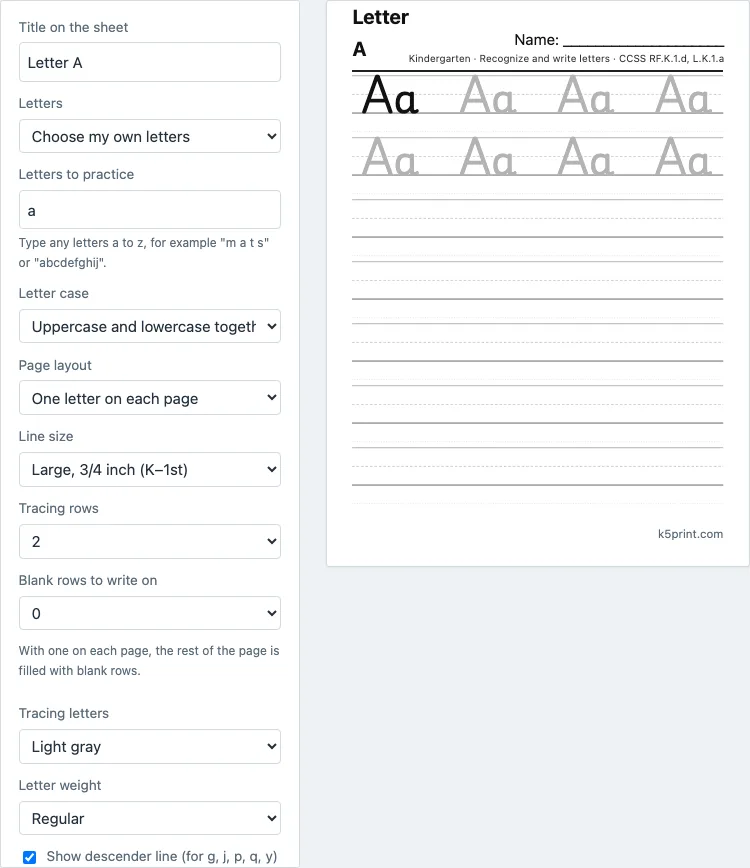
How to make a letter A worksheet
- Check Letters. It is already set to Choose my own letters, with the letter a typed in the box. You can type more letters there, for example a b c, to make a sheet for each.
- Choose Letter case: Uppercase and lowercase together (Aa), Uppercase (A) or Lowercase (a).
- Choose Page layout: One letter on each page (the default), which fills the rest of the page with blank rows, or Many letters on a page.
- Set Line size: Extra large (pre-K–K), Large (K–1st), Medium (2nd) or Small (3rd and up). It starts at Large.
- Set Tracing rows (it starts at 2) and Blank rows to write on. With one letter on each page, the rest of the page is blank rows.
- Choose Tracing letters: Light gray, or Dotted outline if your printer prints gray too faintly. Letter weight can be Regular or Bold.
- Select Print or save as PDF. Use Reset settings to go back to the starting settings.
Choose US Letter or A4 in the print dialog and print at 100% scale (called Actual size in many dialogs) so the lines keep their true height. The page address stores your settings, so a bookmarked or shared link opens the same sheet again.
What should a letter A worksheet include?
A good letter A sheet shows both forms of the letter, capital A and lowercase a, because children meet both in books. It gives the child a model to look at, letters to trace and room to write the letter alone. This page does that, with the letters sitting on a top line, a dashed midline and a baseline, so children learn where each part of the letter belongs. It does not draw stroke order arrows; follow the method your teacher uses.
How do I teach the letter A?
Say the letter’s name and its sound together, then show words that start with it, such as apple, ant and alligator. Have the child trace the capital A, then the lowercase a, then write each from memory. Short daily practice works better than one long session: five minutes, one page.
For letter recognition, use the Find the letter activity in the kindergarten worksheets generator and choose A. For a bigger shape to color, try bubble letters.
Which line size is right for my child?
Extra large suits pre-K and early kindergarten, because the letters are big and easy to follow. Large is the usual size for kindergarten and 1st grade. Medium is for children who are ready for smaller writing, and Small for 3rd grade and up. If a child’s letters fall outside the lines, go up one size.
Can I use the sheets with a whole class?
Yes. Print one page per child and use it as a station or a morning activity. If you want each child’s name on the page, ask them to write it on the Name line at the top. For a class that has already learned several letters, switch to Many letters on a page and type the letters you have covered in the Letters to practice box, for example a b c d e.
What comes after the letter A?
Go in the order your reading program uses. Many programs teach letters in an order that is not alphabetical, so check the program before you assume that B comes next. This page works for any letter you type in the box, and the letter tracing page prints the whole alphabet in one go.
Questions teachers and parents ask
Can I make worksheets for other letters?
Yes. Type other letters in the Letters to practice box, for example b c d, or choose The whole alphabet, A to Z. The letter tracing page is set up for the full alphabet.
Is this the capital A and lowercase a?
Yes. The default shows both together (Aa). Choose Uppercase or Lowercase to show only one.
Do the sheets show how to form the letter?
No. The sheets show the letter shape on writing lines, but they do not draw stroke order arrows.
Which font is used?
Playwrite DE Grund, an open source font (SIL Open Font License) with simple print letters that sit on a four-line grid.
How do I save the sheet as a PDF?
Select Print or save as PDF, then choose Save as PDF in your browser's print dialog. Pick US Letter or A4 first and print at 100% scale so the sizes stay correct.
Can I sell the worksheets I make here?
Yes. The sheets you make here are royalty-free for personal, classroom and commercial use, including Etsy printables, Teachers Pay Teachers and Amazon KDP workbooks. You do not need to give credit. The only limit is that you may not copy the generator itself to run a competing service; see the [terms](/terms/).
Updated