Free · no sign-up · prints on letter or A4
Math Bingo and Multiplication Bingo Generator
Make multiplication bingo and math bingo cards: times tables, division, addition or subtraction facts, with a calling list and cut-out calling cards. Free.
Grade 3Multiply and divide within 100CCSS 3.OA.C.7
Name: ____________________ Date: ______________
Grade 3 · Multiply and divide within 100 · CCSS 3.OA.C.7
Answer key
k5print.com
Need 20 different versions at once, your own logo, no ads? Teacher Plan is coming — join the waitlist →
Grade levels and Common Core standards for this tool
The grade and standard on each sheet follow your settings. Here is every combination this tool can make:
| Grade | Skill | Common Core |
|---|---|---|
| Grades K–1 | Add and subtract within 10 | K.OA.A.2, 1.OA.C.6 |
| Grades 1–2 | Add and subtract within 20 | 1.OA.C.6, 2.OA.B.2 |
| Grade 3 | Multiply and divide within 100 | 3.OA.C.7 |
| Grades 3–4 | Multiplication and division facts to 12 | 3.OA.C.7, 4.NBT.B.5 |
- Facts like 12 × 9 are over 100, past 3.OA.C.7.
- CCSS K.OA.A.2
- Solve addition and subtraction word problems, and add and subtract within 10, e.g., by using objects or drawings to represent the problem.
- CCSS 1.OA.C.6
- Add and subtract within 20, demonstrating fluency for addition and subtraction within 10. Use strategies such as counting on; making ten (e.g., 8 + 6 = 8 + 2 + 4 = 10 + 4 = 14); decomposing a number leading to a ten (e.g., 13 - 4 = 13 - 3 - 1 = 10 - 1 = 9); using the relationship between addition and subtraction (e.g., knowing that 8 + 4 = 12, one knows 12 - 8 = 4); and creating equivalent but easier or known sums (e.g., adding 6 + 7 by creating the known equivalent 6 + 6 + 1 = 12 + 1 = 13).
- CCSS 2.OA.B.2
- Fluently add and subtract within 20 using mental strategies. By end of Grade 2, know from memory all sums of two one-digit numbers.
- CCSS 3.OA.C.7
- Fluently multiply and divide within 100, using strategies such as the relationship between multiplication and division (e.g., knowing that 8 × 5 = 40, one knows 40 ÷ 5 = 8) or properties of operations. By the end of Grade 3, know from memory all products of two one-digit numbers.
- CCSS 4.NBT.B.5
- Multiply a whole number of up to four digits by a one-digit whole number, and multiply two two-digit numbers, using strategies based on place value and the properties of operations. Illustrate and explain the calculation by using equations, rectangular arrays, and/or area models.
Standards text quoted from corestandards.org. K5Print is not affiliated with or endorsed by the Common Core State Standards Initiative.
© Copyright 2010. National Governors Association Center for Best Practices and Council of Chief State School Officers. All rights reserved.
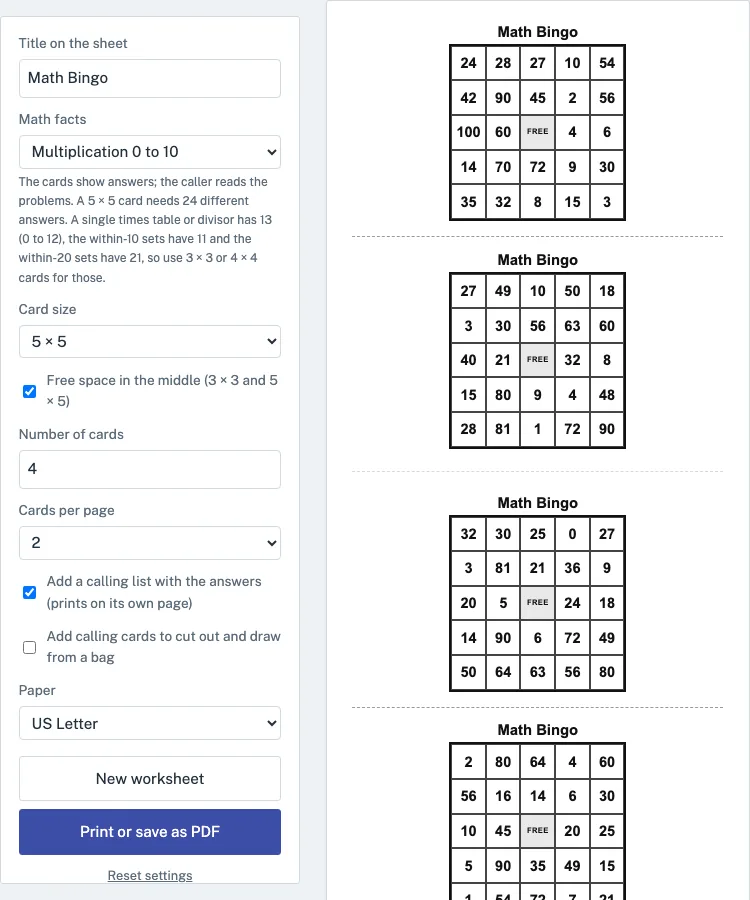
Multiplication bingo is a game where players mark answers on a grid while the caller reads out times-table problems, and this Math Bingo tool makes printable sheets for it. It runs in your web browser, is free, and needs no account or sign-up. You choose the math facts, the card size, and how many different cards to make, then print the sheets or save them as a PDF. Each card shows answers, and the caller reads the problems from a calling list included with the sheet. The same settings also cover division, addition and subtraction, so you can use it with a whole class, a small group or one student at home.
You can use what you make here in class or in things you sell, such as Etsy printables, Teachers Pay Teachers and KDP activity books, with no credit needed.
How to use the Math Bingo
- Type a title in “Title on the sheet.” The default is Math Bingo.
- Open “Math facts” and pick a set. For all the tables up to 10 times 10, keep the default, Multiplication 0 to 10. For one table, choose an option such as Only the 7 times table.
- Choose a “Card size”: 3 × 3, 4 × 4 or 5 × 5. The default is 5 × 5.
- Leave “Free space in the middle (3 × 3 and 5 × 5)” on, or turn it off.
- Enter a number in “Number of cards,” from 1 to 40. The default is 4.
- Pick “Cards per page”: 1 (large), 2 or 4 (small). The default is 2.
- Keep “Add a calling list with the answers” on so the caller has the problems. Turn on “Add calling cards to cut out and draw from a bag” if you want each problem on its own slip.
- Check the sheet preview, which updates as you change settings, then select “Print or save as PDF.”
Paper size can be set to US Letter or A4 before you print. The page address stores your settings, so a bookmarked or shared link opens the same sheet. “New worksheet” makes a different sheet with the same settings, and each sheet has a worksheet code shown under the buttons. “Reset settings” returns everything to the defaults.
How do you play multiplication bingo?
Each player gets a card filled with answers, and the caller reads out a problem such as 7 × 8. Players mark the matching answer on their card, which is 56, and the first player to cover a full line calls bingo. The caller checks the claim against the calling list, where each problem has a tick box for the call and the answer printed in small type after it.
Ask players to say the full fact when they mark a square, such as “7 times 8 is 56.” This turns the game into practice rather than luck. A common approach is to play one table at a time after it has been taught, then use a mixed set for review.
Which facts should I use for 3 × 3 or 4 × 4 cards?
Pick a set with enough different answers to fill the squares. A 3 × 3 card with the free space needs 8 different answers, and a 4 × 4 card needs 16. Each card also has no repeated answers, so the set must be large enough for every square.
Multiplication 0 to 10 gives 43 different answers and 0 to 12 gives 60, so they easily fill 5 × 5 cards. A single times table, such as Only the 3 times table, or a single divisor has 13 answers. That is enough for a 3 × 3 card but not a 4 × 4 card, which would leave blank squares. Addition or subtraction within 10 has 11 answers, so use a 3 × 3 card. Within 20 has 21 answers, which fills a 4 × 4 card.
Some facts share an answer. For example, 3 × 8 and 4 × 6 both make 24. The calling list uses only one of them for that answer, so each answer is called exactly once.
Which math bingo settings suit each grade?
Choose the fact set your class is learning now. In kindergarten and 1st grade, addition or subtraction within 10 on 3 × 3 cards keeps the game short and every square easy to read. In 2nd grade, move to addition and subtraction within 20 on 4 × 4 cards. Third grade is where multiplication and division facts within 100 are learned, so start with a single times table, such as Only the 4 times table on 3 × 3 cards, and move to Multiplication 0 to 10 on 5 × 5 cards once several tables are known. In 4th and 5th grade, Multiplication 0 to 12 or Mixed × and ÷ to 10 makes a quick review warm-up.
For a whole class, set Number of cards to the number of students; every card is different, so two players never hold the same card. Print with 2 cards per page to save paper, or 1 per page for younger children who need large squares.
Questions teachers and parents ask
How do I make math bingo cards for my class?
Choose a math facts set, set "Number of cards" to your class size (up to 40), and pick a card size. Every card in a set is different, so each student gets a unique card. Print with the calling list included, and choose 1, 2 or 4 cards per page.
Can I make division or addition bingo?
Yes. Division sets such as "Division to ÷ 10" or "Only dividing by 7" use whole-number answers, so 56 ÷ 7 is called and players mark 8. Addition, subtraction, and mixed + and − sets are also available. Remember that addition within 10 has only 11 answers, so use a 3 × 3 card for it.
How many different cards can I print?
You can make up to 40 different cards in one sheet using "Number of cards." Each card has its own arrangement, and no answer appears twice on the same card. For a second batch with the same settings, select "New worksheet."
Is this math bingo generator free?
Yes. It runs in your web browser, nothing is uploaded, and no account or sign-up is needed. You can print the sheet or save it as a PDF using the browser's print dialog.
Can I use this for classic number bingo or picture bingo?
No. This page only makes math fact bingo. For bingo with numbers 1 to 75, pictures or your own words, a dedicated bingo card generator is a better fit.
Can I sell the math bingo cards I make here, for example on Etsy or Teachers Pay Teachers?
Yes. The math bingo cards you make here are royalty-free for personal, classroom and commercial use, including Etsy printables, Teachers Pay Teachers and KDP activity books. You do not need to give credit. The only limit is that you may not copy the generator itself to run a competing service; see the [terms](/terms/).
Updated