Free · no sign-up · prints on letter or A4
Military Time Chart
Print a free military time chart: 24-hour times from 0000 to 2300 beside 12-hour AM and PM times, with how to say each one. Add blank charts and practice.
Grades 3–4Convert between 12-hour and 24-hour timeNot a Common Core standard
Name: ____________________ Date: ______________
Grades 3–4 · Convert between 12-hour and 24-hour time
Answer key
k5print.com
Need 20 different versions at once, your own logo, no ads? Teacher Plan is coming — join the waitlist →
Grade levels and Common Core standards for this tool
The grade and standard on each sheet follow your settings. Here is every combination this tool can make:
| Grade | Skill | Common Core |
|---|---|---|
| Grades 3–4 | Convert between 12-hour and 24-hour time | None |
- The 24-hour clock is not a Common Core standard. Telling time and AM and PM are 2.MD.C.7 and 3.MD.A.1.
Standards text quoted from corestandards.org. K5Print is not affiliated with or endorsed by the Common Core State Standards Initiative.
© Copyright 2010. National Governors Association Center for Best Practices and Council of Chief State School Officers. All rights reserved.
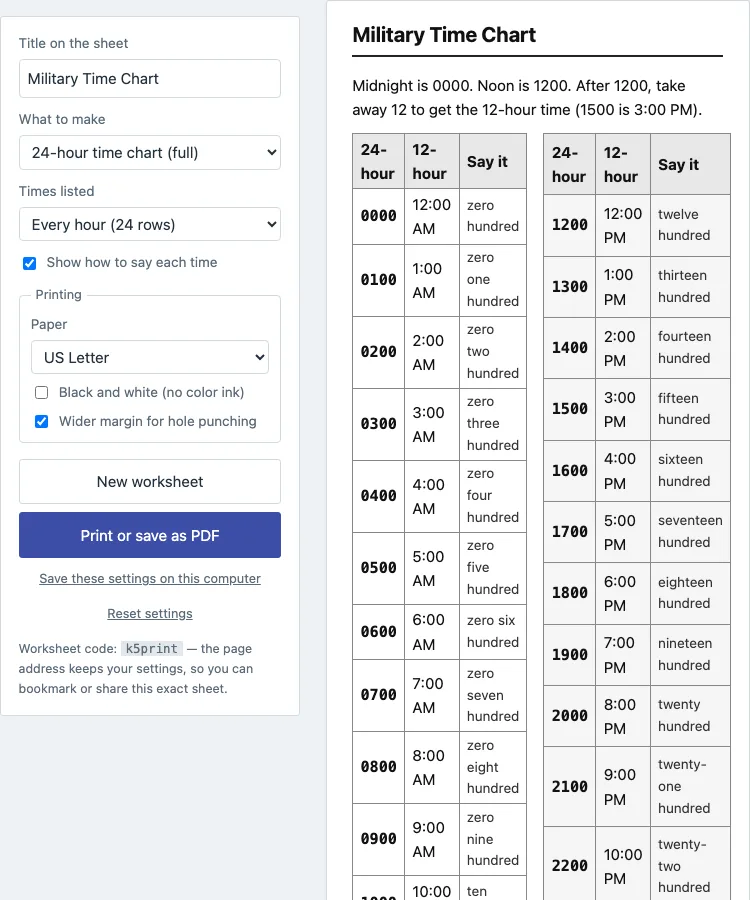
A military time chart lists the 24 hours of the day as four digits, from 0000 (midnight) to 2300 (11 PM), beside the ordinary 12-hour time. This page makes that chart for printing. It has two tables, 0000 to 1100 on the left and 1200 to 2300 on the right, with a column that shows how to say each time out loud. It runs in your web browser, it is free, and nothing is uploaded.
The same page makes a chart with the 12-hour column left blank, so students fill it in, and a conversion practice sheet with an answer key. You can list every hour or every half hour, and the practice times can fall on the hour, half hour, quarter hour or every 5 minutes.
You can use what you make here in class or in things you sell, such as Etsy printables and Teachers Pay Teachers, with no credit needed.
How to make a military time chart
- Choose what to make in What to make: 24-hour time chart (full), Chart to fill in (24-hour times given), or Conversion practice (both ways).
- For a chart, set Times listed to Every hour (24 rows) or Every half hour (48 rows).
- On the full chart, keep Show how to say each time ticked to print the Say it column, for example fifteen hundred for 1500, or untick it for a narrower chart.
- For conversion practice, set Direction (24-hour to 12-hour, 12-hour to 24-hour, or both), Times are (on the hour, hours and half hours, every quarter hour, or every 5 minutes) and Problems (8, 12, 16 or 20).
- Keep Include answer key ticked for the fill-in chart and the practice sheet. The key prints on its own page after the sheet.
- Change Title on the sheet if you want your own heading.
- Select Print or save as PDF. Use New worksheet to get different practice times, and Reset settings to go back to the start.
Choose US Letter or A4 in the print dialog. Use Black and white (no color ink) if you print on a plain printer; the PM rows are already shaded lightly so the two halves of the day are easy to tell apart. The page address stores your settings, so a bookmarked or shared link opens the same sheet again.
What is military time?
Military time is the 24-hour clock. The day runs from 0000 to 2359 instead of being split into two 12-hour halves with AM and PM. The first two digits are the hour and the last two are the minutes, so 0830 is 8:30 in the morning and 2015 is 8:15 in the evening. Hospitals, airlines, the armed forces and many schedules use it because a four-digit time cannot be mixed up between morning and evening.
How do you convert military time to regular time?
From 0100 to 1159, the hour stays the same and the time is AM: 0900 is 9:00 AM. At 1200 it is 12:00 PM, which is noon. From 1300 to 2359, subtract 12 from the hour and call it PM: 1500 is 3:00 PM and 2345 is 11:45 PM. Midnight is the exception. 0000 is 12:00 AM, and the hours from 0000 to 0059 are 12:00 AM to 12:59 AM.
Going the other way, keep AM times as they are with a leading zero (7:05 AM is 0705), add 12 to the hour for PM times after noon (4:20 PM is 1620), and write 12:00 AM as 0000.
How do you say military time?
Say the two hour digits, then the two minute digits. On the hour you say hundred: 0800 is zero eight hundred and 1500 is fifteen hundred. With minutes, say them as a number: 1530 is fifteen thirty and 1745 is seventeen forty-five. A minute under ten is said oh and the digit, so 1005 is ten oh five and 0005 is zero zero oh five. The Say it column on the chart follows these rules.
What should students practice first?
Start with the full chart and the pattern after noon: each PM hour is the 24-hour number minus 12. Then try the fill-in chart on the hour. When that is easy, use the conversion practice with half hours, then quarter hours, then every 5 minutes. Switching the Direction to 12-hour to 24-hour is usually harder than 24-hour to 12-hour, because the student has to remember to add 12 and put in the zero.
Students who are still learning the clock face can practice with telling time worksheets first.
Questions teachers and parents ask
Is 0000 or 2400 midnight?
Both are used, but this chart uses 0000 for the start of a new day and shows 12:00 AM beside it. Some schedules write 2400 for the end of the day, which is the same moment as 0000 on the next day.
Is this a military time converter?
No. It makes a printable chart and practice sheets. It does not take a time you type and convert it. The chart lists every hour or half hour, so you can look up a time on the page.
Is there a colon in military time?
In the usual written form there is none: 1530, not 15:30. Some people write 15:30 for the same time. The practice sheets use the four-digit form with the word hours, as in 1530 hours.
Can I leave off the Say it column?
Yes. Untick Show how to say each time on the full chart. The fill-in chart does not show the column.
How do I save the sheet as a PDF?
Select Print or save as PDF, then choose Save as PDF in your browser's print dialog. Pick US Letter or A4 first and print at 100% scale.
Can I sell the worksheets I make here?
Yes. The sheets you make here are royalty-free for personal, classroom and commercial use, including Etsy printables, Teachers Pay Teachers and Amazon KDP workbooks. You do not need to give credit. The only limit is that you may not copy the generator itself to run a competing service; see the [terms](/terms/).
Updated