Free · no sign-up · prints on letter or A4
Spelling Test Generator
A spelling test generator for teachers and parents: type your words, choose a test format and print it with an answer key, free.
Grades 1–5Spelling practiceCCSS L.1.2.d, L.2.2.d, L.3.2.e, L.4.2.d, L.5.2.e
Name: ____________________ Date: ______________
Grades 1–5 · Spelling practice · CCSS L.1.2.d, L.2.2.d, L.3.2.e, L.4.2.d, L.5.2.e
Answer key
k5print.com
Need 20 different versions at once, your own logo, no ads? Teacher Plan is coming — join the waitlist →
Grade levels and Common Core standards for this tool
The grade and standard on each sheet follow your settings. Here is every combination this tool can make:
| Grade | Skill | Common Core |
|---|---|---|
| Grades 1–5 | Spelling practice | L.1.2.d, L.2.2.d, L.3.2.e, L.4.2.d, L.5.2.e |
- The words are yours, so the grade depends on your list.
- CCSS L.1.2.d
- Use conventional spelling for words with common spelling patterns and for frequently occurring irregular words.
- CCSS L.2.2.d
- Generalize learned spelling patterns when writing words (e.g., cage → badge; boy → boil).
- CCSS L.3.2.e
- Use conventional spelling for high-frequency and other studied words and for adding suffixes to base words (e.g., sitting, smiled, cries, happiness).
- CCSS L.4.2.d
- Spell grade-appropriate words correctly, consulting references as needed.
- CCSS L.5.2.e
- Spell grade-appropriate words correctly, consulting references as needed.
Standards text quoted from corestandards.org. K5Print is not affiliated with or endorsed by the Common Core State Standards Initiative.
© Copyright 2010. National Governors Association Center for Best Practices and Council of Chief State School Officers. All rights reserved.
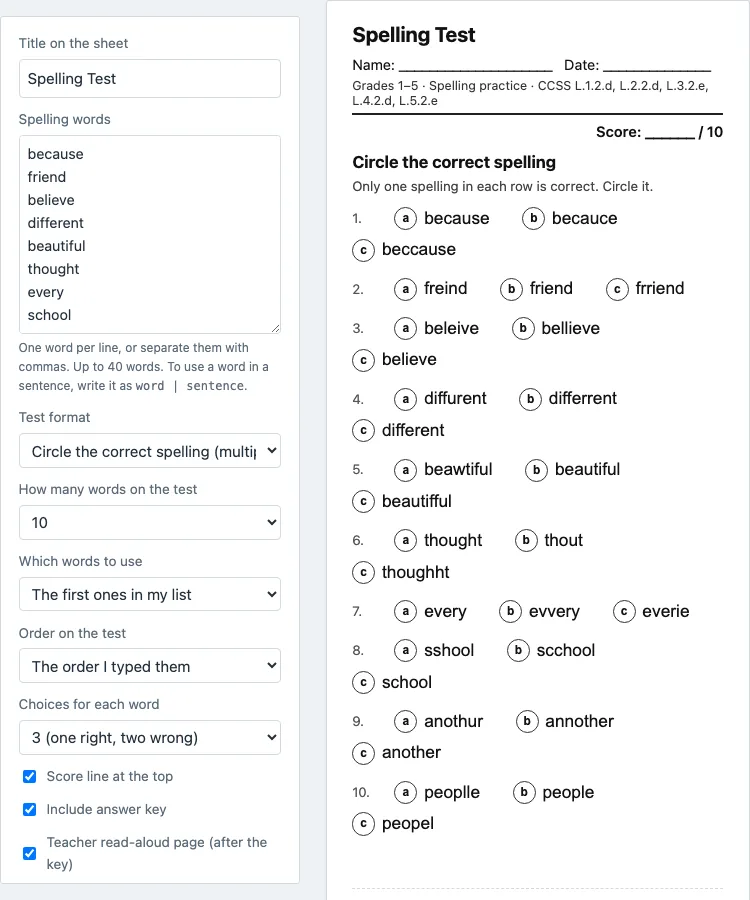
This spelling test generator builds a printable spelling test from your own word list. You paste up to 40 words, choose one of seven test formats, and the page shows a live preview as you change the settings. The test prints with an answer key on its own page and an optional teacher read-aloud page. It runs in your browser, is free, needs no sign-up, and nothing you type is uploaded. Settings are saved in the page address, so you can copy a link that reopens the exact same test, or press New worksheet for a fresh version with the same words. You can use the tests in class or in things you sell, with no credit needed.
How to make a spelling test
- Type or paste your words into the Spelling words box, one per line or separated by commas on one line. Replace the 10 starter words. Up to 40 words are used; repeats and entries under 2 letters are skipped, and a note tells you.
- To add an example sentence, write
word | sentenceon a line. Sentences are needed only for the “Write the word in its sentence” format; the teacher page also reads them out. - Pick a Test format: Circle the correct spelling, Write the word, Fill in the missing letters, Unscramble the word, Match wrong spellings to the right ones, Write the word in its sentence, or Mixed test.
- Choose how many words to use (5, 8, 10, 12, 15, 20, 25, 30, 40, or all words in the box) and which ones: the first words in your list or random words.
- Choose the order on the test, as typed or shuffled. Add a title, and keep or remove the score line at the top.
- Leave Include answer key ticked for a key on its own page after the test. The Teacher read-aloud page is on by default and lists the words in test order: say the word, read the sentence, then say the word again.
- Pick US Letter or A4, black and white if you like, and a wider margin for hole punching. Then press Print or save as PDF.
- Use Copy link to this test to save the exact test, or New worksheet for a new version with the same words.
How can I create my own spelling test?
Paste your word list into the Spelling words box, one word per line or separated by commas, and choose a test format. The preview updates as you work, so you can check the test before you print it.
Use the words your student is studying this week. If you want a sentence used in the sentence format or read aloud, add it after a vertical bar on the same line, such as happy | The puppy was happy to see us. Then set how many words to test and whether they come from the start of the list or at random. Shuffle the order if you do not want the test to follow the list. Add a title and print. The answer key prints after the test, and the teacher read-aloud page is on by default.
Which test format should I use?
For a quick check, use Circle the correct spelling. Each word gets one correct spelling and two wrong ones, or three wrong ones if you choose four choices. For a fuller test where the student writes each word, use Write the word: the teacher reads each word aloud and the student writes it on a numbered line.
Fill in the missing letters blanks about a third of the letters and keeps the first letter; you can blank random letters or the vowels. Unscramble the word mixes the letters so they never appear in the original order. Match wrong spellings to the right ones suits a short review, in groups of up to six. Write the word in its sentence needs example sentences, shows a word bank, and handles endings such as -s, -ed and -ing.
The Mixed test uses about a quarter of your words for each of choosing the spelling, missing letters, unscrambling and writing the word, labeled Parts A to D, with question numbers continuing across the parts. Before you print a multiple-choice test, read the wrong spellings, because one may by chance look like a real word. A word with only one kind of letter cannot be unscrambled, so the tool leaves it out and shows a note.
What is the best way to study for spelling tests?
Short daily practice works better than one long session, so spread the words over several days. For each word, look at it, say it, cover it, write it, and check it against the list. Practice the words that were missed, and keep the learned words in the list for a quick review.
A simple routine is to pick five to ten words, practice them for a few minutes, and then test with a Write the word sheet. The spelling worksheets page builds practice sheets from the same word list, so you can use them between tests and use this generator for the end-of-week check.
Questions teachers and parents ask
Is this spelling test generator free to use?
Yes. It runs in your browser, needs no sign-up or account, and nothing you type is uploaded. It is free for classroom and commercial use, and no credit is needed.
Where is the answer key?
The answer key prints on its own separate page after the test. It marks the correct choice and shows missing letters, unscrambled words and match letters, so you can keep it apart from the student copies.
Can I get 100 words to spell?
This page has no built-in word lists, so you supply the words, and the tool uses up to 40 at a time. For graded lists, see the [spelling bee word lists](/spelling-bee-word-lists/), and for the Dolch list, see [sight words](/sight-words/), then copy the words you want into the box.
Can I use the printed tests in products I sell?
Yes. Tests made here are free for classroom and commercial use, including Teachers Pay Teachers, Etsy and Amazon KDP, and no credit is needed. The only limit is that you may not copy the generator itself to run a competing service; see the [terms](/terms/).
How are the wrong spellings made?
The tool builds wrong spellings from common mix-ups, such as ie and ei swaps like freind, doubled or single letters, swapped vowels and swapped neighboring letters. It never uses a word from your own list as a wrong choice, but glance over them before printing, because a wrong spelling can by chance look like a real word.
Can I make a second version of the same test?
Yes. Press New worksheet to get a new version with the same words: new wrong spellings, new scrambles and new random picks. This helps with makeup tests or two versions for seating.
Updated